
Troubleshooting: XyPriss Security Violation (libXESS Environment Confinement)
How to diagnose and resolve the critical XessShieldRequiredError when launching a XyPriss server instance outside of the supervised confinement boundary.
This exception is intentionally fatal. The native XHSC engine and guardsRunner() intentionally crash the process before network sockets bind or secrets decrypt when libXESS confinement is absent.
Error Summary
When attempting to execute a XyPriss server instance directly using raw runtime runners (such as node, bun, ts-node, or standard unsandboxed package runners), the application halts immediately with a Critical Security Violation / Emergency exception payload.
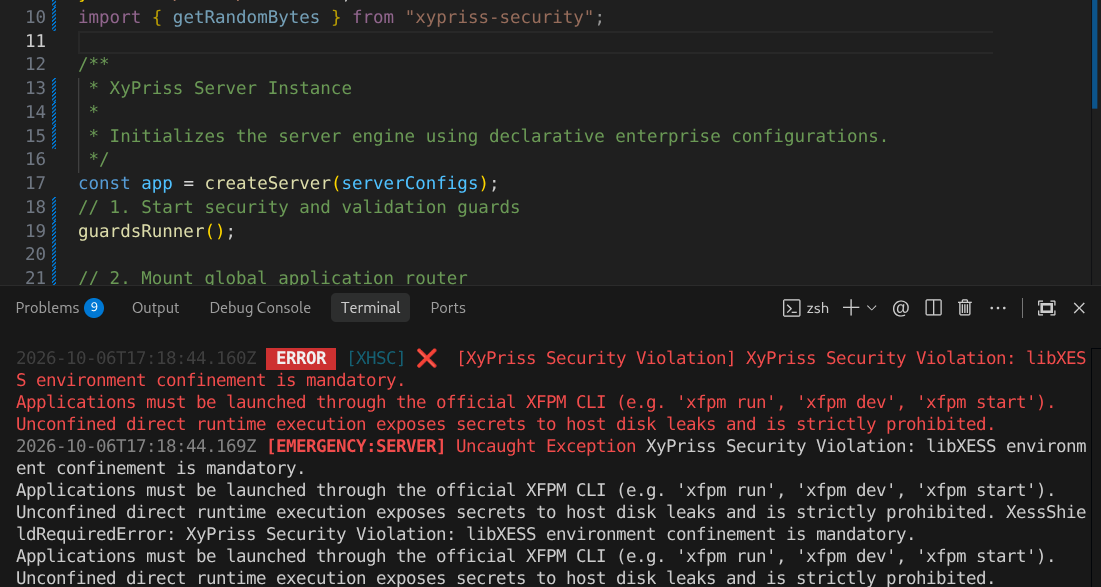
Applications must be launched through the official XFPM CLI (e.g. 'xfpm run', 'xfpm dev', 'xfpm start').
Unconfined direct runtime execution exposes secrets to host disk leaks and is strictly prohibited.
XessShieldRequiredError: XyPriss Security Violation: libXESS environment confinement is mandatory.
Cause of the Error
This error occurs because XyPriss enforces mandatory security isolation via libXESS at boot time. When your entrypoint executes, the guardsRunner() sequence and native XHSC engine verify active cryptographic confinement:
If the boot sequence detects that the process was invoked outside of the official XFPM CLI environment, it immediately aborts execution to prevent environmental secrets from leaking to unshielded host memory or plaintext storage.
Without libXESS active, third-party packages in node_modules could harvest process.env or read plaintext configuration files on disk. The confinement shield must be established before user code runs.
Solutions
Solution 1: Use the Official XFPM CLI Commands
Do not invoke runtime engine files directly with naked runtime commands (node, bun, ts-node, or tsx). You must spin up the server environment exclusively through XFPM:
Starts dev server with Fileonix watcher and libXESS shield.
xfpm devExecutes the target in an isolated, one-shot shielded process.
xfpm runLaunches clustered or standalone production daemon.
xfpm startUpdate your package.json scripts:
// package.json
{
  "scripts": {
    // ❌ UNSUPPORTED (triggers XessShieldRequiredError):
    // "dev": "node src/server.ts",
    // "start": "bun dist/server.js",

    // ✅ OFFICIAL CONFINED WORKFLOW:
    "dev": "xfpm dev",
    "start": "xfpm start",
    "build": "xfpm run build"
  }
}Solution 2: Fix Outdated or Unsupported XFPM Tooling
If you are already running xfpm commands but still encounter this restriction, your local engine framework or CLI version is likely outdated or incompatible with the codebase configuration. Choose one of the following upgrade paths:
Option A: Forced CLI Engine Upgrade (Fastest Local Fix)
Cross-PlatformForces a clean local pipeline synchronization and updates the installed CLI binary:
xfpm upgrade -fOption B: Clean Core Reinstallation (Linux / macOS)
Bash / ZshDownloads and executes the latest automated distribution installer directly from the network node:
curl -sL https://xypriss.nehonix.com/install.js | nodeOption C: Clean Core Reinstallation (Windows PowerShell)
PowerShellFetches and initializes the official environment framework scripts in PowerShell:
invoke-restmethod https://xypriss.nehonix.com/install.js | nodeAlternatively, download install.js manually from the URL and run node install.js inside your terminal.
Related Documentation
Deep dive into secret vaulting, honeypots, and memory retention.
System prerequisites, platform binaries, and global setup.
Learn how the Zero-Trust confinement engine isolates secrets and neutralizes supply-chain attacks.